Best Crawl Space Humidity Monitors for Home Protection
Crawl spaces are notorious for moisture problems that can foster mold, wood rot, and structural damage. A reliable humidity monitor helps you detect temperature and humidity fluctuations early, enabling timely ventilation and dehumidification. This guide highlights five Amazon picks that balance long-range wireless capabilities, battery life, and robust data logging. Use these insights to compare devices suited for under-house spaces, basements, and other damp locations. The summary table below provides quick comparisons of core strengths for each model to help you decide which monitor best fits your crawl space needs.
| Product | Brand | Key Benefit | Range / Logging |
|---|---|---|---|
| ThermoPro TP60 | ThermoPro | Long-range monitoring for crawl spaces | 500 ft / MAX-MIN records / -4°F to 158°F |
| ThermoPro TP50 | ThermoPro | Indoor comfort indicators and fast updates | Indoor use; updates every 10s; HIGH/LOW records |
| Govee Bluetooth Hygrometer | Govee | App-based monitoring with CSV export | 262 ft range; ±0.54°F / ±3%RH; 20 days onboard |
| SensorPush HT.w | SensorPush | Bluetooth monitoring with gateway option | 100 m; 45 days onboard |
| SensorPush HT1 | SensorPush | Easy setup and long-term data capture | 100 m; 20 days onboard |
ThermoPro TP60 Long-Range Humidity Monitor

The ThermoPro TP60 is designed for broad coverage, delivering readings from up to 500 feet away thanks to strong signal penetration for its humidity sensors. It offers a dual indoor/outdoor perspective by measuring temperature and humidity concurrently, with a wide range that accommodates challenging crawl space environments. The device is either tabletop or wall-mountable, giving flexible placement options in tight spaces. It is powered by three included AA-type batteries, simplifying setup in locations where power access is limited. Expect MAX and MIN records to track long-term fluctuations.
In crawl spaces, the TP60’s long-range capability helps keep a remote monitor within reach, even when the space is separated by walls or other obstacles. The trend arrows indicate warming or cooling trends, aiding timely action on ventilation or dehumidification. While the TP60 excels at coverage and durability, it operates as a standalone system without a direct Wi-Fi gateway, so remote cloud access is not inherent. For users who want broad monitoring with simple local alerts, the TP60 delivers solid performance with minimal setup.
Installation is straightforward: place the main receiver in a central area of the home and position the remote sensor near the crawl space opening. The included battery power reduces the need to chase down wall outlets. Users should note that signal quality can vary with building materials and interference. Regularly checking MAX/MIN data helps identify seasonal humidity patterns and plan proactive moisture control strategies.
ThermoPro TP50 Digital Hygrometer Indoor Monitor
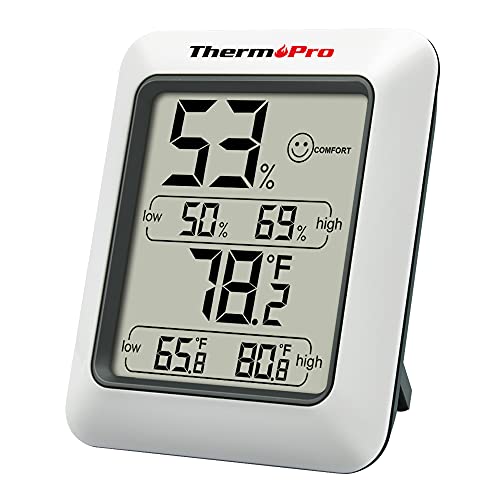
The ThermoPro TP50 focuses on precise, quick readings for indoor environments, providing a vivid Air Comfort Indicator that signals DRY, COMFORT, or WET conditions at a glance. With accuracy in the neighborhood of ±2–3% RH and ±1°F, this unit is well-suited for spaces that experience rapid humidity shifts, such as basements adjacent to damp crawl spaces. It updates every 10 seconds, offering near real-time awareness of changes and enabling rapid responses to moisture spikes. High and low temperature and humidity records help track daily and seasonal patterns.
TP50’s compact design makes it a practical choice for spot checks in crawl spaces connected to living areas. The device’s emphasis on clarity—through the comfort indicators and readable display—reduces guesswork when deciding whether to run dehumidification or adjust ventilation. However, the TP50 does not emphasize external sensor links or cloud-based data logging; it excels as a dependable, fast-refresh monitor for interior humidity control and quick situational awareness.
Placement considerations include choosing a location with stable power or easy battery access and avoiding direct sunlight or heat sources that could skew data. For crawl spaces, placing the TP50 inside the home near the access point provides a reliable view of the environment influencing the under-floor area. Regular data checks help establish humidity baselines and support proactive maintenance routines, such as moisture barrier checks and dehumidifier scheduling.
Govee Bluetooth Hygrometer Thermometer

Govee’s Bluetooth Hygrometer Thermometer delivers app-based monitoring with a practical 262-foot range under favorable conditions. It is not a Wi-Fi version, which makes it a straightforward, budget-friendly option for users who want local, phone-based alerts. Accuracy sits around ±0.54°F for temperature and ±3% RH for humidity, and the device refreshes roughly every two seconds, providing near real-time awareness of moisture changes. A notable feature is its onboard data storage for up to 20 days and the option to export data as CSV, enabling trend analysis over time.
For crawl space scenarios, the Govee monitor can provide reliable, immediate feedback when paired with a smartphone. The lack of built-in Wi-Fi means remote cloud access requires a gateway or local network setup, which should be considered if continuous remote monitoring is desired. The compact form factor and strong app integration make it a practical add-on for monitoring moisture dynamics in spaces where quick responses are essential to mold prevention and humidity management.
When placing a Govee monitor, consider an elevated spot within the home that still reflects conditions affecting the crawl space. Avoid metal shelves or devices that could interfere with the Bluetooth signal. The CSV export feature supports deeper analysis if you’re tracking humidity trends year over year to inform dehumidification schedules and structural maintenance plans across seasons.
SensorPush HT.w Smart Bluetooth Sensor
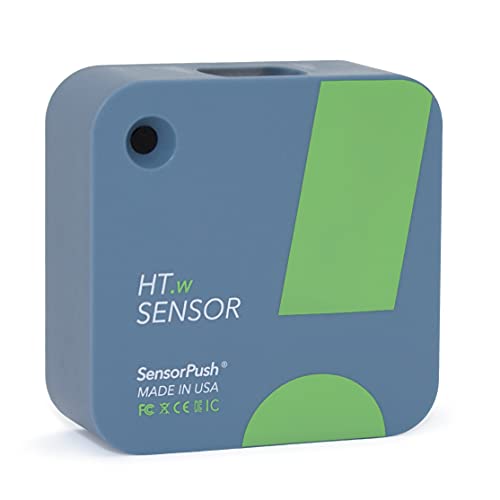
The SensorPush HT.w combines simple Bluetooth setup with robust data logging and a gateway option for remote access. It emphasizes quick installation—no complex configurations—and reliable Bluetooth range of up to 100 meters in line-of-sight conditions. The HT.w continuously records temperature, humidity, dew point, and VPD, with 45 days of onboard data logging and unlimited in-app storage. A G1 WiFi Gateway (sold separately) unlocks remote cloud access and historical data analytics across devices, making it a scalable solution for broader home monitoring.
With crawl spaces in mind, the HT.w offers dependable local monitoring with the option to extend reach via gateway. Its battery life is typically 1–2 years under normal conditions, reducing maintenance. The multi-language app support facilitates use in diverse households. While the gateway adds cost, it enables remote alerts and centralized data review, useful for preventive moisture strategies and coordinating with HVAC or dehumidifier schedules across multiple zones.
Placement focuses on line-of-sight clarity to maximize Bluetooth range. For crawl spaces, locate the sensor where it most directly reflects the under-floor environment—preferably near damp spots, vents, or known moisture entry points. The combination of ease-of-use, long-term data capture, and optional remote access makes HT.w a balanced choice for homeowners seeking a scalable humidity monitoring solution.
SensorPush HT1 Bluetooth Sensor

The SensorPush HT1 mirrors the HT.w family with a straightforward setup and reliable Bluetooth operation suitable for indoor and small-space monitoring. It provides a 100-meter Bluetooth range, easy pairing, and a battery life designed for long-term use. Like the HT.w, it supports 20 days of onboard data logging and unlimited in-app storage, enabling you to review humidity and temperature trends over months. The HT1 is ideal when you want a compact, easy-to-deploy sensor that still integrates with the SensorPush app ecosystem for analysis and alerting.
For crawl spaces, the HT1 is a practical choice when you need quick deployment and consistent data without depending on constant Wi-Fi connectivity. Pairing with a Gateway offers the broader benefits of remote monitoring and cloud storage, should you choose to expand your monitoring footprint. The HT1’s straightforward approach helps maintain a focused monitoring setup while delivering reliable data to guide humidity control strategies in damp environments.
Buying Guide
Connectivity and range
Consider whether you need Bluetooth-only devices or ones that can extend to remote monitoring via a gateway or Wi‑Fi. Bluetooth options work well for local alerts and direct phone access, while gateway-enabled models provide remote visibility, alerts, and long-term cloud storage. For crawl spaces, a long-range Bluetooth device paired with a gateway often offers the best balance between ease of use and remote oversight.
Power and battery life
Most units rely on replaceable batteries. Look for models with long battery life and easy replacement in hard-to-reach locations. Devices with battery indicators or low-power operation reduce maintenance and minimize the risk of missed readings due to power loss.
Data logging and export
Data logging lets you track moisture trends over time. Check how many days of onboard storage a unit provides and whether data can be exported (CSV, etc.) for deeper analysis. In crawl spaces, longer data histories help identify seasonal humidity patterns and improve dehumidification scheduling.
Accuracy and response time
Sensors with higher accuracy (for temperature and humidity) and faster refresh rates provide more reliable readings for moisture management decisions. Real-time or near-real-time updates help you respond quickly to humidity spikes after rainfall or changes in HVAC operation.
Placement and durability
Choose devices with sturdy housings and options for wall-mounting or shelf placement. In crawl spaces, consider moisture resistance and the ability to position sensors away from direct airflow that might skew readings. Proper mounting also ensures the sensor reflects the environment most relevant to the space above it.
Ecosystem and cost
Evaluate whether you prefer a standalone device or one that integrates with a broader monitoring system. While feature-rich gateways add cost, they offer centralized monitoring and longer-term data analysis across multiple zones. Balance initial expenditure against the value of reliable, ongoing moisture insight for mold prevention and structural preservation.