Best Z-Wave Locks for Smart Home Security
Smart locks powered by Z-Wave can streamline access while maintaining strong security. When shopping, focus on hub compatibility, encryption standards, ease of installation, and how you want to unlock your door—keypad, fingerprint, or smartphone app. The following five models represent strong options across major brands, balancing long-range performance, durable hardware, and convenient features such as auto-unlock and remote access. Each section highlights the standout aspects and how they fit into a typical American smart-home setup.
| Product | Brand | Key Benefit | Notable Feature |
|---|---|---|---|
| Kwikset HomeConnect 620 Z-Wave Long Range | Kwikset | Long-range connectivity with keypad entry | Z-Wave Long Range, S2 encryption, SmartStart |
| ULTRALOQ Bolt Pro Z-Wave | ULTRALOQ | Biometric and codes with remote access | Fingerprint ID, codes, Ekeys, App, Auto Unlock |
| Yale Assure Lock 2 Deadbolt ZW2-BSP | Yale | Auto-Unlock and keypad access | Z-Wave integration, Auto-Unlock, Yale Access options |
| Yale Assure Lock with Z-Wave YRD226-ZW2-BSP | Yale | Keypad access with remote control | Auto-Lock, Z-Wave compatibility |
| Kwikset SmartCode 916 Z-Wave | Kwikset | Keyless entry with touchscreen | SmartKey compatibility, 30-second auto-lock |
Kwikset HomeConnect 620 Z-Wave Long Range Enabled Keypad Smart Lock

The Kwikset HomeConnect 620 combines keypad entry with direct Z-Wave Long Range connectivity, designed to extend a direct link to a Z-Wave hub across the home. Its keypad enables secure, keyless entry, making it convenient for families with frequent comings-and-goings. The model emphasizes robust security with S2 encryption, helping protect against interception or tampering. SmartStart technology is included to simplify hub pairing, reducing setup time for both new and existing Z-Wave ecosystems.
On the practical side, this lock is built to work within Ring Alarm systems when the hub is present, offering centralized control through compatible hubs. Installation notes include standard door preparations and plate mounting, with the important caveat that a hub is required to enable full remote features. For households prioritizing long-range coverage and physical keypad access, the HomeConnect 620 is a compelling option.
- Keypad entry for secure, keyless access
- Z-Wave Long Range for expanded hub coverage
- Advanced S2 encryption protects against tampering
- SmartStart for quick hub integration
ULTRALOQ Bolt Pro Z-Wave Smart Lock

The Ultraloq Bolt Pro offers a versatile access toolkit beyond a standard keypad. The lock supports Fingerprint ID plus access codes and Ekeys, all managed via a smartphone app with Z-Wave control. It enables remote management, including sharing codes with family, guests, or service personnel for specific dates or time windows. A key strength is compatibility with Z-Wave Plus and Home Assistant-like ecosystems, allowing voice control through Alexa or Google Assistant when paired with a compatible hub.
Security features center on multi-factor access options and remote visibility, including a log of who entered and when. Ultraloq emphasizes flexibility for people who want both biometric and code-based entry, plus remote monitoring. A bridge or compatible Z-Wave hub is required for full integration, which can add to setup considerations but unlocks broad control and automation potential for modern smart homes.
- Biometric fingerprint ID plus codes and Ekeys
- Remote lock/unlock and activity logs via app
- Works with Z-Wave Plus; voice control via Alexa/Google Assistant with hub
- Auto Unlock and share codes remotely
Yale Assure Lock 2 Deadbolt ZW2-BSP

The Yale Assure Lock 2 Deadbolt focuses on flexible access with multiple options. The lock can be controlled via a Z-Wave smart home or alarm system and corresponding app, enabling remote locking and unlocking from anywhere when connected to a compatible hub. It provides key-free access with a keypad option and supports Auto-Unlock in compatible configurations, offering a hands-free experience when your hands are full. This model is designed for standard doors and includes mounting hardware for straightforward installation.
Yale emphasizes compatibility with a wide ecosystem, including Samsung SmartThings, Ring Alarm, Wink, and more, making it suitable for existing setups. Users should verify hub compatibility and app support for their region, as functionality can depend on the specific hub and service access. The Z-Wave integration aims to balance convenient entry with centralized security management across a smart home.
- Keypad-based, key-free access options
- Remote control via compatible Z-Wave systems and apps
- Auto-Unlock available in compatible configurations
- Broad ecosystem compatibility with major hubs
Yale Assure Lock with Z-Wave YRD226-ZW2-BSP

The Yale Assure Lock with Z-Wave combines keypad access with comprehensive Z-Wave integration for remote control and monitoring. Like other Yale models, it supports flexible unlocking methods and can be paired with compatible hubs to enable remote operation. The product emphasizes secure access through a keypad and the potential for Auto-Lock, providing a practical balance of convenience and security for everyday use.
Users should ensure hub compatibility and confirm whether Auto-Unlock or Auto-Lock features are available in their specific configuration. This lock’s compatibility with major smart-home ecosystems makes it a strong candidate for households already invested in a Z-Wave network, offering reliable operation alongside standard door hardware.
- Keypad entry plus remote Z-Wave control
- Auto-Lock functionality may be available depending on configuration
- Works with compatible hubs and alarm systems
Kwikset SmartCode 916 Z-Wave Smart Lock
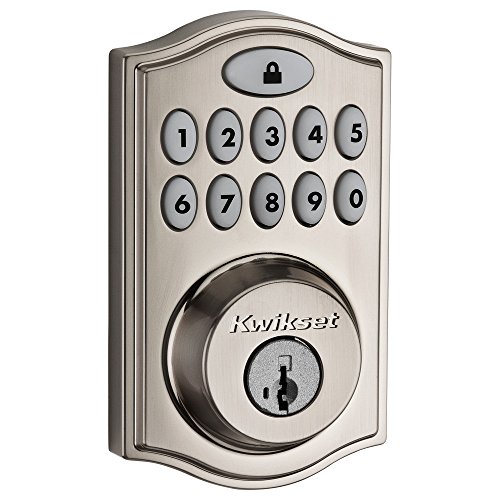
The Kwikset SmartCode 916 blends a traditional deadbolt form with modern wireless control. It features a touchscreen for keyless entry and supports remote access through a Z-Wave hub. The lock integrates with popular voice assistants and home systems, enabling seamless voice or app-based control when paired with a compatible hub. It also offers a 30-second auto-lock feature to help ensure doors stay secured after entry or exit.
Security is supported through SmartKey security mechanisms, and the lock is designed to fit standard door preparations with adjustable backset. This model is well suited for homes seeking a familiar look with the added convenience of Z-Wave-enabled remote management and automation. Proper hub and compatibility checks will maximize ongoing performance and security.
- Keyless entry via illuminated touchscreen
- Remote access through Z-Wave hub
- Voice control compatibility with supported hubs
- 30-second auto-lock for immediate security
Buying Guide: Key Considerations For Z-Wave Locks
Hub Compatibility And Ecosystem
Every Z-Wave lock relies on a compatible hub to unlock its full potential. Check whether your existing system supports your chosen model (SmartThings, Ring Alarm, Hubitat, Ezlo, or others). Some locks offer extra features—like SmartStart integration or voice control—that require specific hubs or bridge devices. If you already use a particular hub, prioritize models explicitly noted as compatible to minimize setup friction.
Security And Encryption
Look for locks that advertise advanced encryption (such as S2) to protect against unauthorized access. Encryption quality matters more than the number of features, because it guards transmission between the lock and the hub. Evaluate whether the model supports secure key management and how firmware updates are delivered to maintain protections over time.
Access Methods: Keypad, Biometric, Or Codes
Keypad locks provide straightforward access without keys, while biometric options (like fingerprint ID) add another layer of verification. Consider which method best suits your household: a shared keypad for guests, or biometrics for quick entry. Some models combine several options (codes, fingerprints, and smartphone apps) for flexible access control.
Auto-Lock And Auto-Unlock
Auto-Lock automatically secures the door after a delay, reducing the risk of leaving the door open. Auto-Unlock can simplify entry when your phone is near the door. Availability varies by model and hub, so verify these features and how they’re configured within the app or hub settings before purchase.
Installation Fit And Durability
Most Z-Wave locks fit standard doors, but thickness and backset ranges vary. Confirm that the lock’s mounting hardware supports your door thickness and alignment. Also consider weather rating and interior/exterior hardware durability, especially if the lock will be exposed to the elements or heavy daily use.
Remote Management And Activity Logs
Remote access is valuable for granting entry to guests or service providers without physical keys. Look for locks that provide access logs so you can see who entered and when. If you need to monitor multiple doors from a single interface, verify that your hub supports centralized event history and notifications across devices.
Pricing And Long-Term Value
Prices vary by feature set, brand, and hub requirements. Weigh the cost of the lock against the hub and any required bridges. For households already investing in a smart-home ecosystem, a model with broader compatibility and richer access options can offer better long-term value than a purely keypad-based alternative.
In summary, choose a Z-Wave lock that aligns with your hub, security expectations, and preferred access methods. The five models highlighted here provide a spectrum of options—from long-range keypad solutions to biometric-friendly systems—ensuring you can select a device that suits a typical American home, while maintaining strong security and convenient control.