Best Mini CNC Machines for Home Workshops and DIY Projects
Compact, beginner-friendly, and capable of turning wood, plastic, and softer materials into precise engravings and patterns, mini CNC machines are a popular choice for home workshops. The following five models represent strong options for entry-level users and hobbyists seeking reliable performance, upgrade paths, and safe operation in tight spaces. Each entry below highlights what makes it stand out, with a focus on ease of use, expansion potential, and practical versatility.
| Product | Brand | Approx. Work Area | Key Strength |
|---|---|---|---|
| SainSmart Genmitsu 3018-PROVer V2 | SainSmart | ~300 x 180 mm | Beginner-friendly with easy assembly and upgrade path |
| Carvera Air Desktop CNC Machine | MAKERA CARVERA | Compact, enclosed footprint (~19.7″ x 17.7″) | Enclosed design with quick tool changer |
| FoxAlien Masuter Pro CNC Router | FoxAlien | Compact 3-axis, all-metal | Rigid construction and upgrade options |
| CNCTOPBAOS 1610 PRO CNC Milling Machine | CNCTOPBAOS | 7.08 x 3.93 inches (18 x 10 cm) | Offline controller included; GRBL 1.1f |
| CNCTOPBAOS 3018-PRO-MAX | CNCTOPBAOS | 30 x 18 x 4.5 cm | Offline controller and higher spindle potential |
SainSmart Genmitsu 3018-PROVer V2 CNC

The Genmitsu 3018-PROVer V2 is widely regarded as a top entry-level option for beginners stepping into desktop CNC routing and engraving. Its value proposition centers on a straightforward assembly process and a build designed for near-immediate use. The gantry frame and one-piece aluminum spoilboard are pre-assembled, which cuts setup time dramatically. Cable management is clear and organized, helping new users avoid tangled wiring as they learn. Lean into its beginner-friendly architecture by starting with simple woodworking projects and gradually exploring plastics and soft materials.
Expansion is a key strength. The PROVer V2 supports a broad ecosystem of add-ons, including extension kits, a more capable spindle, and offline control solutions. While the base kit is compact, it’s designed to scale with your growing interests, from carving signs and gifts to small-batch crafts. The option to add accessories makes this model a practical long-term investment for a home shop that values both reliability and adaptability.
In terms of use, this machine is well-suited for small hobby projects, personalized gifts, and introductory learning. The combination of a solid frame, precise routing, and the availability of upgrades makes it easier to experiment safely and productively. For newcomers who want a platform with room to grow, the Genmitsu PROVer V2 offers a compelling balance of affordability, capability, and upgrade potential.
Carvera Air Desktop CNC Machine
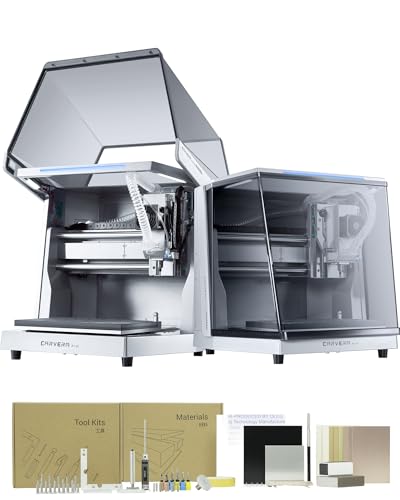
The Carvera Air emphasizes a compact, enclosed footprint with a focus on safety and clean operation. Its closed design helps contain chips and dust, making it a strong choice for users working in smaller spaces or those who want to maintain a tidy workspace. A standout feature is the quick tool changer, designed to reduce downtime between tasks and enable smoother workflows when switching between different operations or materials. The machine is paired with Makera CAM software, delivering a user-friendly design-to-cut pipeline that supports rapid prototyping.
Performance metrics center on versatility and ease of use. The Carvera Air supports a range of materials suitable for hobbyists, including wood, plastic, and soft composites. Optional upgrades such as a 4th axis or a laser add-on broaden capabilities without needing a completely new machine. For those who value an all-in-one feel—combining safety, software support, and practical tooling—this model provides a compelling balance of convenience and capability in a compact package.
In practice, Carvera Air suits beginners who want a protected, enclosed workspace with straightforward operations, while still offering room to grow through tool changes and CAM software compatibility. It’s a dependable platform for learning the basics of 3-axis machining and evolving to more complex projects over time.
FoxAlien Masuter Pro CNC Router

The FoxAlien Masuter Pro combines a robust all-metal frame with a reinforced Z-axis, delivering solid performance for precise engraving and cutting on wood, acrylic, and other soft materials. Its rugged construction helps minimize vibration and enhances repeatability, which is valuable for beginners learning feeds and speeds. An upgraded dust-proof controller box adds practical protection and keeps essential controls within easy reach, including an emergency stop for immediate shutdown in case of an issue.
Versatility is another highlight. The Masuter Pro ships with two spindle clamps (52mm and 65mm) that accommodate multiple spindle configurations, including a 60W or 300W spindle, and it supports future upgrades such as a 65mm router or a 1.5 kW spindle. The setup is designed to accommodate diverse projects—from simple signs to more intricate panel carving—without requiring a wholesale equipment change. This flexibility, combined with reliable hardware, makes Masuter Pro a strong candidate for learners who expect growth without outgrowing their machine quickly.
CNCTOPBAOS 1610 PRO CNC Milling Machine

The 1610 PRO from CNCTOPBAOS is designed as an upgrade option with a GRBL offline controller, allowing operation without a continuous PC connection. This is a valuable feature for those who want to work independently from a computer, using an SD card to load G-code. The machine’s work area is compact, measuring roughly 18 x 10 cm with a Z-axis height of about 4.5 cm, making it well-suited for small-scale projects. The inclusion of an upgraded GRBL 1.1f control board and a robust spindle system supports higher performance while maintaining approachable usability for beginners.
Safety and control are emphasized with an outer casing, E-stop port, and integrated limit switches. The controller’s interface and ports are designed to offer reliable homing and basic probing, which helps new users learn precise starting points and repeatable workflows. This model balances a smaller footprint with important features that make CAD-to-CNC transitions smoother for newcomers who want to explore engraving, PCB work, and light milling with a desktop tool.
CNCTOPBAOS 3018-PRO-MAX CNC

The 3018-PRO-MAX represents a higher-capability variant in the CNCTOPBAOS line, designed for users who want more power from a compact desk machine. It features an offline controller that pairs with a GRBL control system, enabling operation without a constant computer connection. The working area is expanded to about 30 x 18 x 4.5 cm, providing more room for larger projects while remaining compact enough for most home workshops. A 775 spindle motor rated around 120W supports stronger performance, with an ER11 chuck for flexible tooling. The control system supports higher-speed operations up to approximately 20,000 rpm in some configurations.
As with other CNCTOPBAOS models, the Pro-Max emphasizes accessibility alongside capability. It ships with an offline controller for stand-alone use and offers compatibility with standard GRBL workflows, which keeps it approachable for beginners while granting enough power for more ambitious engraving or light milling tasks. If you want a desktop machine that can grow with your skills and handle bigger pieces, this model provides a well-rounded option with practical upgrade paths.
Buying Guide
Choosing the right mini CNC machine depends on workspace, ambitions, and how you plan to grow your skills. Here are key considerations to help you compare models effectively:
- Workspace and footprint: Measure your workspace and compare it with each machine’s footprint and work area. Enclosed designs can reduce dust and noise but may require more space for safe operation.
- Build quality and rigidity: All-metal frames typically offer better rigidity and repeatability than plastic or hybrid builds. A stable Z-axis and well-supported gantry improve surface finish on engraving and milling tasks.
- Control options: Decide whether you prefer a computer-based workflow using GRBL-compatible software or a device with an offline controller for stand-alone operation. Offline controllers are convenient but may limit certain workflows.
- Spindle power and speed range: Spindle wattage and RPM influence material compatibility and cutting ability. Higher power spindles handle tougher materials but may require additional cooling and safety considerations.
- Software ecosystem: Look for machines with user-friendly CAM and control software, plus online communities and vendor support. Software compatibility affects how easily you design, import, and toolpath-cut your projects.
- Upgrade paths and accessories: Assess whether the model supports future upgrades—additional axes, laser modules, or longer spindles—and whether compatible accessories are widely available.
- Safety features: Enclosures, emergency stop, dust management, and clear cable routing contribute to safer operation, especially for beginners working in small spaces.
- Material range and project types: Consider what you want to make—signage, jewelry, PCB prototyping, or small furniture details—and verify the machine’s suitability for those materials.
- Noise and ventilation: Some compact CNCs can be loud or generate significant dust. Enclosures and proper ventilation help maintain a comfortable home workshop.
For beginners, prioritize models with easy assembly, solid customer support, and a readily available ecosystem of accessories. As you gain experience, you may opt for machines with offline operation or expanded work areas to tackle larger projects. The five models above offer a spectrum—from basic, easy-to-learn kits to more capable machines with offline control and upgrade options—so you can select a solution tailored to your space and long-term goals.