Best Laser Cutter for Wood: Top Picks for 2026
Finding the right laser cutter for wood involves balancing power, precision, and ease of use. This guide highlights five reliable models that are well-suited for wood engraving and cutting, from hobbyist projects to small-business tasks. Each option offers strong accuracy, solid safety features, and approachable setup—helping you compare capabilities without getting overwhelmed.
Summary table of chosen products:
| Product | Brand | Engraving Power | Working Area | Key Strength |
|---|---|---|---|---|
| LONGER Ray5 | Longer | 5W | 400×400 mm | High-speed, 0.01 mm engraving accuracy |
| Creality Falcon 5W | CREALITY | 5W | 400×415 mm | High-precision engraving with large bed |
| xTool S1 Basic Bundle | xTool | 40W | 23.93″ x 15.16″ bed | Powerful, beginner-friendly with AutoPassthrough |
| ACMER S1 6000mW | ACMER | 6W | 130×130 mm | Ultra-fine 0.04 mm spot, precise cuts |
| Carverall K15 Pro 5W | Carverall | 5W | 200×300 mm | Real 5W power with quick setup |
LONGER Ray5 5W Laser Engraver

The LONGER Ray5 combines a compact footprint with a 400×400 mm working area, making it suitable for a wide range of wood projects. It uses a 5W laser source and a small laser spot size of 0.08×0.08 mm, supporting precise engraving down to 0.01 mm. A 240 MHz ESP32 chipset drives fast processing and stable offline operations, enabling high-speed carving up to 10,000 mm/min. The offline capability helps users work without continuous computer connection, which can speed up workflows for craft and prototype tasks.
Its 400×400 mm work area accommodates mid-sized boards and plaques, while the hardware is designed for consistent results across different materials like wood, acrylic, glass, and metal coatings. Beginners will appreciate the straightforward setup, while hobbyists can push intricate patterns thanks to the fine laser spot and tight positioning accuracy. Safety features, software compatibility, and a robust community support ecosystem further enhance its appeal for wood crafters.
Creality Falcon 5W Laser Engraver

The Creality Falcon 5W Laser Engraver emphasizes precision with a refined 0.06×0.06 mm spot size and a positioning accuracy within 0.004 inches. The 32-bit processing power helps maintain high engraving speeds up to 10,000 mm/min, enabling rapid iteration on complex designs. A generous 400×415 mm bed supports larger wood panels, while optional accessories like a rotary roller enable cylindrical object engraving for expanded project versatility. The machine is designed for reliable performance on wood, leather, acrylic, glass, and more, with a focus on repeatable results for professional-looking outcomes.
xTool S1 Basic Bundle 40W

The xTool S1 Basic Bundle brings substantial power with a 40W laser and a large bed, enabling fast, deep cuts in wood and other materials. It supports large projects thanks to its 23.93″ x 15.16″ bed and features AutoPassthrough Technology for very long or curved items. Pinpoint positioning and smart software integration (XCS) allow precise engraving on curved surfaces and easy workflow for beginners. The bundle approach commonly includes essential accessories, making it a strong choice for those planning frequent, ambitious wood projects or signs.
Carverall K15 Pro 5W
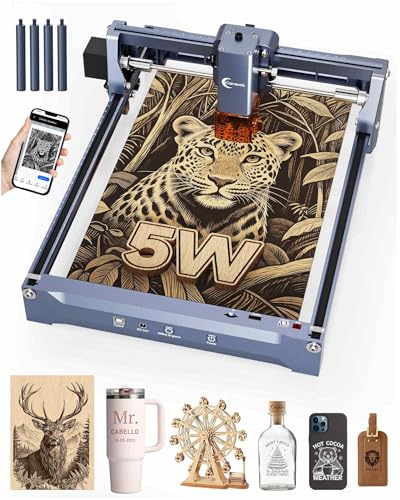
The Carverall K15 Pro 5W laser is positioned for beginners and hobbyists who want real 5W power in a compact 200×300 mm working area. It promises 0.01 mm ultra-precision with a commendable engraving speed of up to 15,000 mm/min. The device emphasizes user-friendly setup—designed to be put together quickly with minimal tools—and compatibility with common software like LightBurn and LaserGRBL, plus a supportive ecosystem with safety glasses and test materials. This model suits those starting out or needing a portable option for on-site wood engraving tasks.
Buying Guide: Key Purchase Considerations
When selecting a laser cutter for wood, consider these core factors to balance performance, cost, and reliability:
- Power and material reach: Higher wattage generally enables deeper cuts and faster engraving; however, for thin woods, 2–6W often suffices. Choose based on typical material thickness and desired finish.
- Engraving accuracy and speed: Look for a small laser spot size and repeatable positioning accuracy (often 0.01 mm or better) to reproduce fine details. Speed should align with project volume and workflow requirements.
- Working area: A larger bed is useful for signs, plaques, and panels, but larger machines may be heavier and more expensive. Match bed size to common project dimensions.
- Software and compatibility: Beginner-friendly software with presets and material libraries can shorten the learning curve. Confirm compatibility with Windows, macOS, and popular tools like LightBurn or LaserGRBL.
- Ease of assembly and setup: Some models arrive preassembled or nearly ready to run, offering faster startup for beginners. Consider whether you prefer plug-and-play or a configurable system for advanced users.
- Safety and maintenance: Look for enclosure options, safety interlocks, and accessible maintenance routines. Regular calibration and lens cleaning are important for consistent results.
- Support and ecosystem: A robust community, vendor support, and available replacement parts help sustain long-term use and troubleshooting.
Material and Project Perspectives
Wood engraving ranges from decorative signs and plaques to detailed hobby projects. Lower-wattage units excel at fine engraving on thin plywood or basswood, while higher-wattage devices can tackle thicker boards or deeper cuts. For beginners, preassembled units with beginner-friendly software reduce setup friction. For professionals, a large working area and advanced features like AutoPassthrough or air assist can boost productivity and enable more complex designs across multiple materials such as acrylic and leather, alongside wood.
Operational Considerations
Operational factors influence long-term satisfaction. Offline operation can help maintain workflow independence when a computer connection is unreliable. Speed and precision matter most for intricate patterns, while firmware stability and software updates affect daily use. Compatibility with popular design tools ensures you can import and adapt existing artwork, reducing the need to rework designs for each machine. Finally, evaluate the total cost of ownership, including consumables like lenses, safety gear, and replacement parts.
Material Versatility and Expansion
Most of these machines support a broad range of materials beyond wood, such as bamboo, leather, acrylic, and certain ceramics. Some models also offer accessories for larger or cylindrical objects, expanding the types of projects you can execute, from signage to personalized gifts. If your projects require curved surfaces or longer materials, consider machines with auto-forwarding features, extended beds, or optional rotary attachments.
Conclusion (Contextual, No Personal Opinion)
Choosing a laser cutter for wood involves aligning specific project needs with machine capabilities. The listed models provide a spectrum of power, bed sizes, and beginner-friendly features, making it easier to compare options without assuming a single best fit. Use this guide as a framework for evaluating how each unit’s strengths map to your typical wood projects, workflow, and learning curve. The right choice balances performance, reliability, and long-term scalability for your engraving and cutting needs.