Best Desktop CNC Mills for Home Workshops
Choosing the right desktop CNC mill depends on your workload, materials, and how much you value ease of use. This guide highlights five capable machines that span beginner-friendly units to compact upgrade options. Each selection is evaluated on build quality, ease of use, and expansion potential. The following table offers a quick snapshot to help you compare at a glance.
| Product | Brand | Notable Feature |
|---|---|---|
| Carvera Air Desktop CNC Machine With 4th Axis | MAKERA CARVERA | 4th axis option, quick tool changer, all-in-one CAM |
| CNCTOPBAOS 1610 Pro Desktop CNC Mill | CNCTOPBAOS | Offline controller, SD card G-code, compact size |
| CNCTOPBAOS 3018-Pro-Max CNC Mill | CNCTOPBAOS | GRBL USB control, easy assembly, solid frame |
| 3018-SE V2 Engraving Machine | SHATUOA | High efficiency engraving, 80W spindle |
| RATTMMOTOR DIY CNC Router Kit | RATTMMOTOR | Aluminum frame, straightforward assembly, 3-axis |
Carvera Air Desktop CNC With 4th Axis
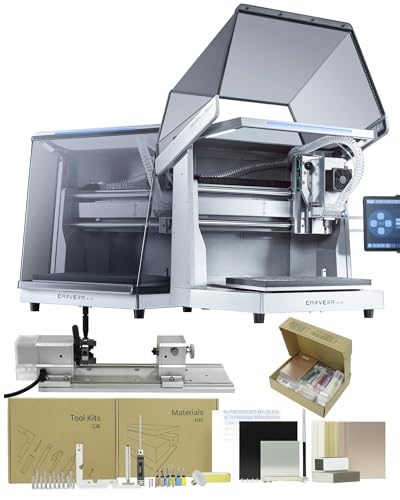
Carvera Air is a compact, enclosed desktop CNC mill designed for hobbyists and makers. It excels at milling, carving, and engraving across wood, plastics, and soft metals, aided by an intuitive software ecosystem. A quick tool changer reduces transitions between operations to about ten seconds, streamlining multi-step projects. Auto probing and leveling simplify setup on uneven stock, while the optional 4th axis expands capabilities to cylindrical work and intricate 3D shapes. The machine accommodates a rotary work area of 3.6 inches in diameter by 7.9 inches long, enabling true 4th-axis simultaneous machining. The enclosure helps keep dust down and the workspace tidy.
Beyond the basics, Carvera Air supports PCB fabrication workflows and DIY crafts with an all-in-one CAM software package. Its modular design invites upgrades, such as adding a laser module for combined milling and engraving tasks. This makes Carvera Air a versatile choice for those who want room to grow without relocating to a larger system.
CNCTOPBAOS 1610 Pro Desktop CNC Mill

The CNCTOPBAOS 1610 Pro is a compact desktop mill that emphasizes offline operation. It ships with a white offline controller, letting you load G-code from an SD card without tying up a computer. The device supports manual X, Y, and Z zeroing to set engraving origins, and features a robust control board with basic safety and probe ports. Its working area spans about 7.08 by 3.93 by 1.77 inches, with a spindle capable of up to 10,000 rpm and ER11 collets for flexible bit use. An upgraded GRBL 1.1f board adds reliability for hobbyists tackling simple PCB or wood projects.
This model emphasizes accessibility and upgrade potential, including options to push spindle speeds higher and add an engraver module. It suits beginners who want a no-fuss setup plus room to learn, without needing a full-size milling machine. The combination of offline control and a compact footprint makes it a solid starter or secondary machine for light-duty manufacturing tasks.
CNCTOPBAOS 3018-Pro-Max CNC Mill

The 3018-Pro-Max is a user-friendly three-axis desktop milling kit designed for wood, PCB, and light plastic work. It features USB connectivity and GRBL control, which keeps setup straightforward for beginners. Assembly is generally quick, with a stable frame and clear documentation. The working area measures about 11.8 by 7.1 by 1.8 inches, making it suitable for small parts and quick prototyping. A 775 spindle up to 120W (operating within a 12-36 V range) delivers adequate power for hobby projects, while the ER11-compatible spindle accepts a range of bits for engraving and milling.
The included GRBL-based control system is widely supported, and the design emphasizes maintenance ease and upgrade paths. This model is well suited for learners moving from basic engraving to simple subtractive machining, with enough capability to tackle hobby projects and small DIY tasks.
3018-SE V2 Engraving Machine
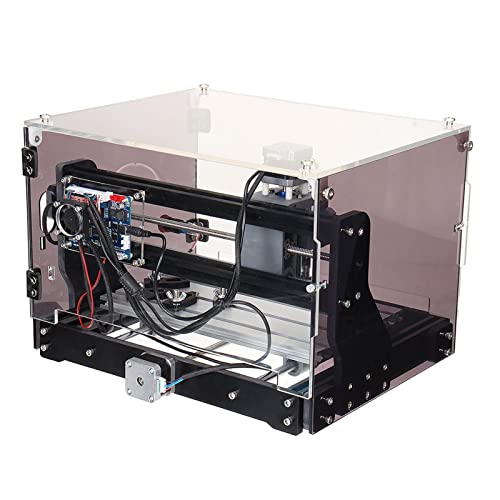
The 3018-SE V2 is a compact 3-axis engraving system designed for fast, high-efficiency work. Powered by an industrial-grade control chipset and an 80W spindle, it achieves rapid engraving with consistent results. The machine emphasizes accurate calculations and reliable stepper motor control, which reduces drift and missed steps during operation. It’s capable of handling wood, plastic, and light acrylic projects with a transparent enclosure that helps users monitor progress while keeping dust contained. This model is ideal for makers who want dependable engraving without a steep learning curve.
Its simplicity makes it a popular choice for hobbyists and educators who need a straightforward tool for producing signs, nameplates, or custom decorations. The blend of solid hardware, dependable control, and an affordable price point positions it as a practical entry into desktop CNC engraving.
RATTMMOTOR DIY CNC Router Kit
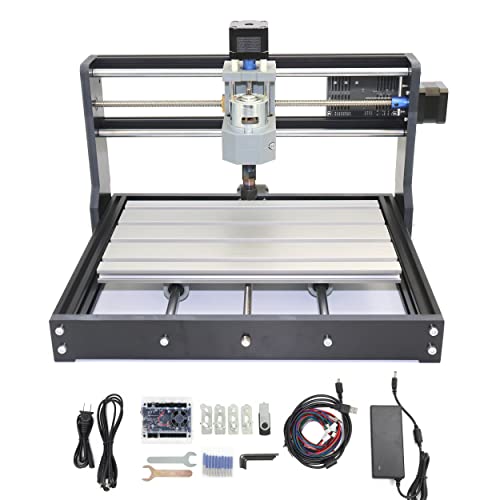
The RATTMMOTOR DIY CNC Router Kit is a versatile three-axis option designed for hobbyists who enjoy building and customizing their tools. Its aluminum alloy frame provides a sturdy base, while the fixed external framework helps with stability during carving and milling tasks. The kit accommodates a working area around 18x10x4.5 cm and uses a 775 spindle motor with a 42-stepper motor drive. With straightforward assembly and a USB-driven workflow, it’s suitable for projects ranging from PCB work to light wood carving. It’s particularly appealing for those who want a hands-on experience and the ability to tweak performance over time.
For beginners, the RATTMMOTOR kit offers a practical entry point into CNC milling with a balance of cost, capability, and upgrade potential. It’s well suited to learners who enjoy iterative improvements and want a project that grows with their skills.
Buying Guide
When selecting a desktop CNC mill, consider the following criteria to match your use case and budget. Start with your primary materials, project size, and whether you prefer a PC-connected workflow or an offline controller. Then evaluate build quality, spindle power, and expansion potential to ensure the machine grows with your needs.
- Project scope and work area: Match the machine’s X-Y-Z travel and the physical footprint to your typical part sizes. Smaller desks need compact machines, but ensure the work area fits your most common parts.
- Spindle power and routing capability: Higher wattage spindles enable cutting denser materials and thicker stock. Check rpm range, collets (ER11 vs larger), and compatibility with your preferred bits.
- Control system and software ecosystem: Decide between USB/GRBL control, offline controllers, and CAM software support. Offline options are convenient for classrooms or installations with limited PC access.
- Upgrade paths and expansion: Features like a 4th axis, laser modules, or additional end mills increase long-term value. Consider whether the manufacturer offers compatible add-ons and spare parts.
- Assembly, documentation, and support: Clear manuals, quick-start guides, and accessible customer support reduce setup friction, especially for beginners.
- Materials and noise: Enclosures help with dust and noise. Assess the enclosure quality and if the design minimizes vibration for smoother finishes.
- Safety features: Overloads, emergency stop, limit switches, and electrically isolated work area improve safety during operation and maintenance.
For newcomers, entry-level three-axis models with good documentation and offline capability typically offer the best balance between learning curve and capability. If your focus is PCB fabrication or precise engraving, look for stable spindle performance and precise axis control. For makers planning to explore 3D shapes or cylindrical parts, a system with a 4th axis or rotaries can unlock new workflows without demanding industrial-scale hardware. Always verify compatibility with your preferred materials and the availability of replacement bits and spindles in your region.
In summary, the best desktop CNC mill for you depends on your ambitions and workspace realities. The five selections above cover a spectrum from beginner-friendly to upgrade-ready, helping you start with confidence and grow into more complex projects over time. Always start with a clear list of your typical tasks, then choose a model that offers the right balance of ease, power, and expandability.