Best PWM Fan Hub: Top Choices for PC Cooling and Expansion
Choosing a PWM fan hub can simplify cooling in a PC by distributing the motherboard PWM signal to multiple fans. This guide highlights five top-rated options compatible with 4-pin PWM fans, ARGB lighting, and SATA-powered hubs. Each product is evaluated for expandability, signal integrity, and installation simplicity to support silent builds and high-performance rigs. The table below provides a quick snapshot to aid fast comparisons.
| Product | Brand | Key Benefit | Ports |
|---|---|---|---|
| ARCTIC Case Fan Hub | ARCTIC | 9 extra slots; synchronous PWM | 10 ports |
| ASUS TUF Gaming ARGB PWM Fan Hub | ASUS | Six fans; ARGB sync; indicators | 6 ports |
| SilverStone SST-CPF04-USA | SilverStone | 8-Port PWM; speed detection | 8 ports |
| The Thermaltake Commander FP | Thermaltake | Direct SATA power; up to 10 PWM fans | 10 ports |
| ShakingTank ARGB PWM Hub | Shaking Tank | 9-port ARGB/PWM; magnetic backplane | 9 ports |
ARCTIC Case Fan Hub
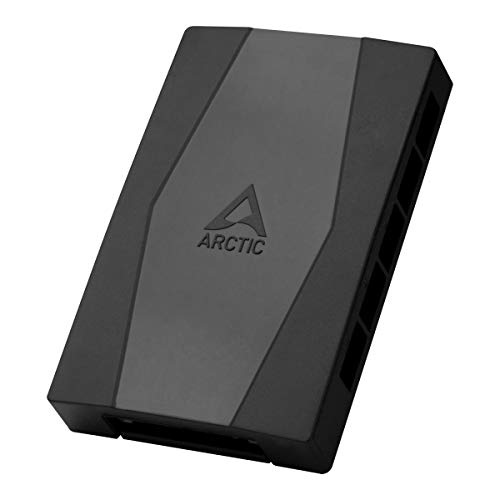
The ARCTIC Case Fan Hub provides a compact solution to expand a system’s cooling capacity. It supports a single motherboard PWM signal that is passed synchronously to all connected fans, ensuring consistent speed control. The hub reads the RPM of the first connected fan and reports it back to the system, enabling accurate monitoring. With nine additional fan slots beyond typical headers, this hub is well suited for builds that require robust intake or exhaust air without cluttered cable management.
Power delivery uses SATA for convenience, reducing the need for multiple power cables inside the chassis. This setup is especially helpful in compact cases where interior space is at a premium. Ideal for users who want reliable speed synchronization across multiple fans while keeping cable routing tidy and unobtrusive.
ASUS TUF Gaming ARGB PWM Fan Hub

The ASUS TUF Gaming ARGB PWM Fan Hub is designed for slick, visible builds where cooling and lighting synchronize. It supports up to six case fans with PWM control and includes a dedicated ARGB connection for compatible lighting across connected devices. Clear power and operation indicators help users verify status at a glance, making troubleshooting straightforward. The hub is built to maintain stable operation while expanding cooling capacity beyond the motherboard’s native headers, making it a solid option for mid- to large-sized gaming rigs.
Beyond cooling, the hub’s ARGB integration enables synchronized lighting effects across fans and strips, enhancing aesthetics without sacrificing performance. Its compact footprint and straightforward installation suit enthusiasts who want cohesive lighting and cooling without adding complexity to cable management.
SilverStone SST-CPF04-USA 8-Port PWM Hub

SilverStone’s SST-CPF04-USA is an eight-port PWM hub designed for reliable speed control across multiple fans. It uses a 2200 μF capacitor to stabilize voltage, which helps maintain consistent fan speeds under varying loads. The hub supports speed detection for accurate fan control, allowing users to monitor and adjust performance effectively. This option suits builds that demand dependable PWM behavior with a straightforward installation approach and a compact form factor that fits neatly into most cases.
With robust power handling and clear speed feedback, the SilverStone hub is a practical choice for users who want to expand beyond motherboard headers without sacrificing stability. It pairs well with both standard 4-pin PWM fans and scenarios where predictable RPM is critical for acoustics and cooling balance.
Thermaltake Commander FP PWM Hub

The Thermaltake Commander FP is a SATA-powered hub that supports up to ten PWM fans, making it suitable for high-airflow builds needing extensive fan control. Its direct SATA power input helps prevent voltage drops under load and reduces the risk of fan instability when multiple fans are active. Included cable ties, Velcro tabs, and a PWM signal cable keep installations tidy and secure, helping maintain clean cable management and organized routing inside the case.
Designed for expandability, Commander FP enables users to scale cooling as chassis demands grow. The combination of SATA-powered operation and a generous port count makes it a strong candidate for enthusiasts who want reliable performance and straightforward setup in larger builds.
ShakingTank ARGB PWM Hub Controller

The ShakingTank ARGB PWM Hub combines ARGB lighting control with PWM fan management in a nine-port hub. Each port supports PWM for fan speed synchronization and 5V 3-pin ARGB compatibility for lighting. A magnetic backplane design allows easy placement on metal surfaces inside the case without tape, making the hub highly versatile for mounting in tight spaces. The hub supports up to nine fans and ARGB devices, simplifying both cooling and lighting for visually cohesive builds.
Installers will appreciate the magnetic mounting and flexible positioning, which reduces cable clutter and improves overall airflow inside the chassis. The combination of PWM control and ARGB support offers a compelling option for users prioritizing both performance and aesthetics in compact or modular builds.
Buying Guide
When selecting a PWM fan hub, several considerations ensure you get a solution that meets your needs now and later. First, assess compatibility: confirm the number of PWM fans you plan to run and whether 3-pin or 4-pin fans are supported, as some hubs focus on PWM-only designs while others handle a mix of 3-pin devices. If ARGB lighting matters, choose a hub that supports 5V 3-pin ARGB ports in addition to PWM control.
Power delivery is critical. SATA-powered hubs typically offer stable current delivery for multiple fans, reducing voltage sag under load. Some models also provide DC input options, which can be advantageous in certain builds. Consider your case’s cable routing and the available PSU cables; a hub with tidy cable management features will help maintain airflow and reduce clutter.
Expansion and future-proofing are practical concerns. If you anticipate adding more fans later, a hub with more ports or a scalable design will save effort. Look for hubs with clear RPM readbacks or speed-detection features to monitor performance accurately. Indirect benefits include integrated cable ties and mounting solutions that simplify installation and reduce vibrations.
Performance vs. noise: more fans don’t always mean better acoustics. A hub that maintains stable voltage and synchronized PWM across all ports tends to minimize roll-off and rattling. For builds emphasizing silence, prioritize hubs with robust power regulation and consistent signal distribution, even at higher fan counts.
Brand ecosystem and aesthetics also play a role. Some hubs are designed to complement specific motherboard families or lighting schemes, providing better software compatibility and easier RGB synchronization. Finally, consider price-to-feature value; while premium hubs offer more features, mid-range options often deliver exceptional performance without overbuilding your system.