Best Squeegee for Screen Printing: Durable Tools for Crisp, Consistent Prints
When choosing a squeegee for screen printing, you want a tool that delivers steady ink transfer, long-lasting performance, and comfortable handling. This guide highlights five reliable options featuring wooden or aluminum handles, 65–75 durometer blades, and sizes that cover small to large print jobs. The selections below are tailored for various fabrics and project scales, helping you achieve consistent results across multiple sessions.
| Product | Size (inches) | Durometer | Material | Notes |
|---|---|---|---|---|
| Caydo 2 Pieces 2 Sizes | 9.4 / 5.9 | 75 | Rubber blade, wooden handle | Two sizes for versatility |
| Caydo 3 Pieces 3 Sizes | 5.9 / 9.4 / 13.7 | 75 | Rubber blade, wooden handle | Three sizes for diverse projects |
| Speedball Craft Fabric Squeegee | 9 | 65 | Rubber blade, wood handle | Great for classrooms and fabrics |
| Worown 13.7 Inch Aluminum Handle Squeegee | 13.7 | 75 | Rubber blade, aluminum handle | Large-format capability |
| 14 Inch Screen Printing Ink Squeegee | 14 | 75A | Rubber blade, aluminum handle | Long, wide for broad sections |
Caydo Dual-Size Screen Printing Squeegees

The Caydo set provides two sizes designed for flexible screen printing workflows. Each squeegee uses a rubber blade with a wooden handle, offering a 75-durometer rating for reliable ink transfer and durable performance across multiple sessions. The large 9.4-inch blade covers substantial areas, while the 5.9-inch blade excels at detail or small runs, making it a practical starter combination for enthusiasts or small studios.
Caydo 3 Sizes Squeegee Set

This trio expands printing flexibility with three blade lengths: 5.9, 9.4, and 13.7 inches. Crafted with a rubber blade and wooden handle, these squeegees feature a 75-durometer rating, balancing stiffness and control for consistent ink deposits. The range supports small text, logos, and mid-sized panels on fabrics and posters, enabling efficient workflow transitions between jobs.
Speedball Craft Fabric Squeegee

Designed for fabric printing in classrooms and home studios, this 9-inch Speedball squeegee uses a 65-durometer blade with a rounded edge to promote smooth ink flow on textiles. The wood handle contributes a familiar grip, supporting controlled passes over fabrics and garments. It’s a solid choice for beginners seeking an affordable, reliable option for standard T-shirt projects.
Worown 13.7 Inch Squeegee with Aluminum Handle

This Worown squeegee offers a large 13.7-inch blade with a 75-durometer rubber blade and an aluminum handle, delivering robust ink transfer for sizable prints. The longer reach helps reduce passes on bigger designs, while the durable construction supports repeated use in busy studios. It is suitable for posters, banners, and garment prints that demand broader coverage.
Ruimou 14 Inch Aluminum Handle Squeegee
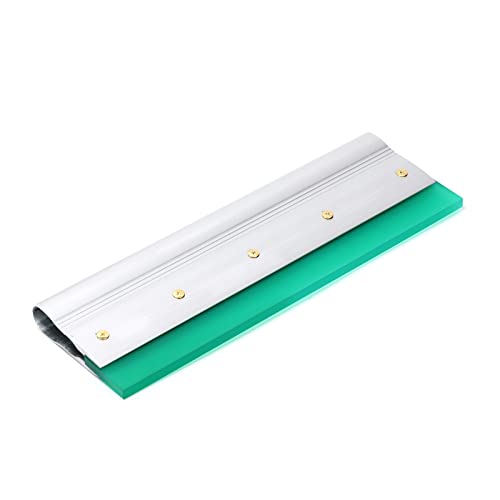
The Ruimou squeegee pairs a long 14-inch blade with an aluminum handle and 75-durometer rubber blade for efficient wide-area printing. Its extended size is ideal for large designs on textiles or signage, offering solid ink distribution with fewer strokes. The screw-based blade replacement adds longevity by enabling easy maintenance as blade wear occurs.
CYCHIRV Screen Printing Squeegee

CYCHIRV presents an 11.8-inch squeegee with a wooden handle and 75-durometer rubber blade. The combination provides wear resistance and reuse potential for basic screen printing tasks. The standard width supports common textile designs, from logos to small art elements, delivering dependable ink deposition across multiple passes.
Speedball 10″ Fabric Squeegee

This Speedball 10-inch squeegee is oriented toward fabric printing, featuring round edges to push ink through the screen for consistent fabric coverage. The 65-durometer blade provides a balance of softness and control, while the wooden handle ensures a comfortable grip during longer sessions. It’s a reliable choice for educators and hobbyists working with textiles.
Worown 13.7 Inch Wooden Squeegee

The Worown 13.7-inch wooden squeegee combines a lightweight wooden handle with a 75-durometer rubber blade. The broader blade supports efficient coverage for mid- to large-format designs, making it suitable for school projects, community print shops, or home studios. Durability and ease of use are key features for ongoing print sessions.
Buying Guide: Key Purchase Considerations
Size and coverage: For small logos or detail work, smaller blades (5.9–9.4 inches) offer precise control. For large designs or banners, longer blades (11.8–14 inches) reduce passes and improve consistency across broad areas.
Blade hardness: A 65–75 durometer blade balances stiffness and ink transfer. Higher hardness resists wear and supports thick ink, while slightly softer blades can be gentler on delicate fabrics.
Handle material: Wooden handles provide a traditional grip and feel; aluminum handles offer lightweight durability and a modern option. Consider your workspace and hand comfort during longer sessions.
Maintenance and durability: Look for blades that can be replaced or re- sharpened as needed. Squeegees with screw-in blades or modular designs extend tool life and reduce downtime between jobs.
Fabric compatibility: Fabric printing requires smooth transfer and control. For textiles with dense or viscous inks, a stiffer blade helps push ink evenly; for lighter inks, a slightly softer blade can improve edge definition. Always test on scrap fabrics before production runs.
Budget and availability: Sets with multiple sizes offer value for varied projects, but individual upgrades may suit specialized tasks. Consider your typical job mix, storage space, and replacement blade costs when choosing a kit.
Ergonomics and workflow: A comfortable grip reduces fatigue during extended sessions. Large-format designs benefit from longer blades to minimize back-and-forth movement and ensure stable pressure across the screen.
Environment and maintenance: Keep blades clean and dry after use to prevent ink buildup and blade corrosion. Regular inspection helps maintain consistent ink deposition and screen performance across sessions.