Best Laser CNC for Wood: Top Picks for Precise DIY Engraving and Cutting
When choosing a laser CNC for wood, you want machines that combine high precision, solid working area, and reliable software compatibility. This guide reviews five standout models popular with hobbyists and small shops, highlighting power, accuracy, bed size, and ease of use. Each option supports wood engraving and cutting with varying materials, from plywood to acrylic. Below, you’ll find a concise product overview followed by an in-depth look at each device, plus a comprehensive buying guide to help you choose the right laser CNC for your wood projects.
| Product | Brand | Laser Power | Working Area | Key Strength |
|---|---|---|---|---|
| Ray5 5W Engraver | Longer | 5W | 400×400 mm | High speed, 0.01 mm engraving accuracy |
| Ray5 20W Engraver | Longer | 20W | 400×400 mm | Multi-pass cutting, 0.01 mm precision, 256-color palette |
| Ray5 5W With Air | Longer | 5W | 400×400 mm | Air assist for cleaner cuts, offline control |
| Carverall K15 Pro 5W | Carverall | 5W | 130×300 mm | Beginner-friendly, versatile compatibility |
| ACMER S1 6W | ACMER | 6W | 130×130 mm | High-precision, versatile materials |
Ray5 5W Engraver — Longer

Powered by a 240MHz ESP32 chipset, the Ray5 5W offers speeds up to 10,000 mm/min. Its laser spot is 0.08×0.08 mm with engraving accuracy of 0.01 mm, enabling detailed patterns on wood and other materials. The 400×400 mm working area supports a variety of project sizes, making it suitable for signs, decor, and small craft pieces. This model emphasizes speed and precision while remaining compact enough for home workshops.
Key considerations: The device supports offline operation and integrates with common software like LaserGRBL and LightBurn via USB or WiFi. A multicore architecture helps with energy efficiency and dependability during long runs. Users should plan ventilation and consider air filtration for wood engraving to maintain cut quality and reduce soot on mirrors and lenses.
Ray5 20W Engraver — Longer

This version doubles the laser power to 20W, enabling single-pass cuts through thicker materials and deeper engravings. It maintains a 400×400 mm workspace and adds advanced features like a built-in 256-color palette for color engraving and a high-precision 0.08×0.1 mm laser point, achieving 0.01 mm engraving accuracy. The upgraded ESP32 chipset supports multi-machine control, making it a solid choice for users who run multiple units or need faster production cycles.
Key considerations: Higher power demands adequate ventilation and may require more robust air-cooling. The unit supports continuous operation and can handle repeating color engraving tasks for creative projects. Given the higher price point, evaluate your typical project thickness and material mix to ensure the investment matches your workload.
Ray5 5W With Air Assist Kit

This Ray5 variant combines a 5W laser with an air assist system to improve cutting efficiency and reduce scorching. The 400×400 mm workspace, a 0.08×0.08 mm laser spot, and 0.01 mm engraving precision remain consistent. Its USB, TF card, WiFi, and app connectivity provide flexible offline and online workflows. An easy setup, including 4-in-1 rotary option, makes it suitable for glass, wood, metal, and ceramic accents, broadening its wood-engraving capabilities.
Key considerations: Air assist lowers smoke and debris, improving cut quality on 3–6 mm stock. The included rotary roller kit expands capabilities for cylindrical objects, but ensure adequate room and safety when rotating objects during engraving. Check local safety standards for enclosed or open configurations in your workspace.
Carverall K15 Pro 5W
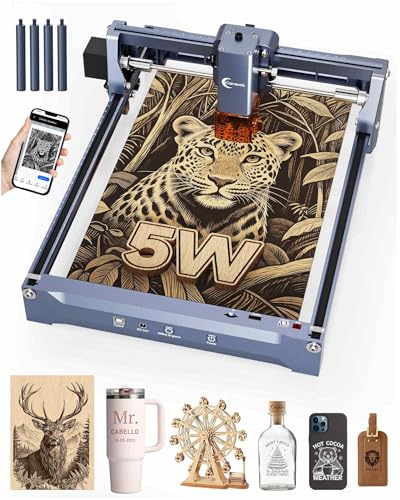
The Carverall K15 Pro offers true 5W laser output with a compact engraving bed of 130×300 mm. It emphasizes precision with 0.01 mm engraving accuracy and a top speed around 15,000 mm/min, making it suitable for detailed jewelry, gifts, and small decor items. The machine is designed for quick setup and broad compatibility, including options to use CutLabX, LightBurn, and LaserGRBL. It includes safety glasses and a straightforward assembly process with six screws and no belts.
Key considerations: The smaller bed is well-suited for frequent, high-precision work on small parts, but may require tiling or multiple passes for larger projects. Assess your typical project scale and whether you need a larger working area or multi-material capabilities. Firmware and software compatibility are important for long-term reliability and easy workflow integration.
ACMER S1 6W Laser Engraver

The ACMER S1 is a 6W diode laser with a 130×130 mm working area, offering 0.04 mm laser spot size and up to 10,000 mm/min engraving speed. It emphasizes ultra-fine positioning accuracy (0.01 mm) and broad material versatility, including wood, acrylic, metal, glass, and more. The unit highlights ease of use with straightforward assembly and a robust feature set for beginners and professionals alike.
Key considerations: The smaller work area makes it ideal for detailed small-part work, but may limit larger signs or panels. Ensure your material thickness aligns with the machine’s capabilities and consider future upgrades if you anticipate expanding your project size or material range. Safety features and user-friendly operation are prominent benefits for first-time buyers or classrooms.
Buying Guide: Key Purchase Considerations And Comparisons
- Power and material capability — Higher wattage (e.g., 10W-20W) enables faster cutting through wood and thicker stock but requires robust ventilation and safety considerations. Lower wattage models excel at fine engraving and thin materials.
- Working area — A larger bed (around 400×400 mm) supports bigger signs and panels, while compact beds suit jewelry, small decor, and prototyping. Consider your typical project size and whether tiling or multi-pass strategies are acceptable.
- Precision and speed — Look for engraving accuracy around 0.01 mm and speeds up to 10,000 mm/min for efficient workflows. Compression optics and fixed focus can enhance detail.
- Software and compatibility — Ensure compatibility with LaserGRBL, LightBurn, and CutLabX, and verify offline vs online workflow support. App or WiFi connectivity can simplify setup in workshops without constant PC access.
- Air assist and cooling — Air assist improves cutting quality by clearing debris and cooling the workpiece. Adequate cooling is crucial for maintaining performance on longer runs, especially with higher-power lasers.
- Safety and enclosure — Fully enclosed units offer enhanced eye protection and smoke containment. Open-frame models may require additional safety measures and airflow considerations in busy studios or classrooms.
- Ease of use and setup — Beginner-friendly kits with preassembly, included safety gear, and simple one-button controls reduce the learning curve. Look for clear manuals and reliable customer support.
- Expandability — Some machines support rotary attachments or multiple machines controlled from a single PC, enabling more complex production lines and diverse project types.
- Cost vs. value — Weigh initial investment against material capabilities, bed size, and software flexibility. A higher-powered model may offer long-term efficiency for larger or more frequent runs.
Overall, the five models covered here cover a spectrum of wood-focused laser CNC options. If your projects require precise, intricate engravings on small pieces, consider the Carverall K15 Pro or ACMER S1 for beginners with strong safety features. For larger, deeper cuts and faster production, the Longer Ray5 options provide scalable power, extensive working areas, and advanced control capabilities. The Ray5 with air assist combines practical airflow management with offline operation for cleaner cuts in wood and other materials.