Best Rotary Tools for Laser Engravers: Top 5 Rotary Rollers for Cylindrical Engraving
Finding the right rotary accessory can dramatically expand what your laser engraver can achieve. The following 5 products are among the most relevant rotary rollers and attachments for engraving cylindrical, spherical, and ring-shaped objects. Each option adapts to different machines, diameters, and workflow needs, helping you move from flat-surface engraving to curved-surface personalization with precision.
| Product | Brand | Key Advantage |
|---|---|---|
| Rotary Roller Pro, 4 in-1 | CREALITY FALCON | 4-in-1 jaws for multiple shapes |
| xTool RA2 Pro | xTool | Wide compatibility and high-speed engraving |
| ORTUR Laser Rotary Roller | Ortur | Seven diameter adjustments |
| Creality Laser Rotary Roller | Creality | Seven diameter options and easy software compatibility |
| Longer RAY5 5W Laser Engraver with Rotary Roller | Longer | Integrated control and high versatility for multiple materials |
Note: The following sections feature product-specific details, focusing on how each accessory supports engraving on curved surfaces, accuracy, setup, and compatibility with common laser software.
Rotary Roller Pro By Creality Falcon

The Rot ary Roller Pro offers a 4-in-1 functionality that accommodates a wide range of shapes. Adjustable jaws support external clamping from 1-110 mm, internal props from 25-75 mm, a hex stud for spheres from 10-130 mm, and ring-shaped items from 15-100 mm. This versatility supports engraving on cylinders, tumblers, wine glasses, rings, and balls. It emphasizes precise angular control of 0.225°, enabling stable, displacement-free engravings. Setup is straightforward: connect to the machine and begin using with popular software options such as LightBurn and LaserGRBL.
Longer Laser Engraver Rotary Roller With Bracket
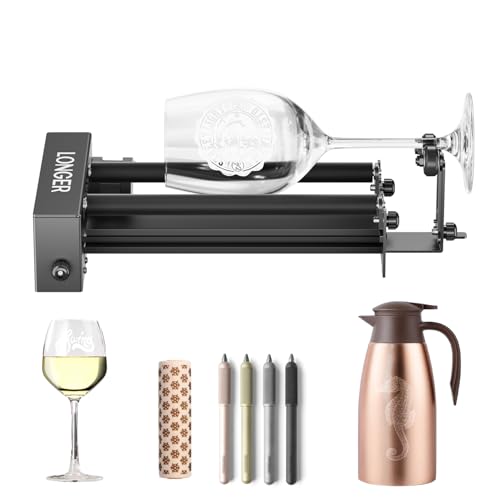
The Longer Rotary Roller features a 360° rotating drum with a robust support and precise positioning system. It is designed to engrave cylindrical objects like wine glasses, mugs, bottles, and cans with stability. The device includes two wiring options to fit a broad range of laser engravers. While installation and wiring may vary by model, the roller is built for reliable engagement and consistent results, reducing misalignment and drift during engraving tasks.
YOOPAI D1 4-in-1 Laser Rotary Roller

YOOPAI D1 provides four modes: Roller Rotary, Chuck Rotary, Sphere Rotary, and Ring Rotary. This 4-in-1 kit expands engraving across cylinders, spheres, ring-shaped items, and irregular cylinders, broadening creative options beyond flat surfaces. It ships with two claw types and pins for flexible clamping. Aimed at precision, the kit emphasizes an accurate stepper motor and transmission system with an error tolerance of ±0.1 mm, ensuring fine details are preserved on curved geometries.
xTool RA2 Pro Rotary Accessory

The xTool RA2 Pro is described as a 4-in-1 attachment—Roller, Chuck, Sphere, and Ring modules—designed for most daily cylindrical objects. It emphasizes higher speed and accuracy engraving through soft-pad jaws that hold objects tightly, enabling smooth operation. Its compatibility footprint includes a broad set of xTool devices and many other laser engravers in the market, with support for Laserbox Basic, LaserGRBL, and LightBurn. The module aims to deliver ultra-fine lines and strong stability for detailed curved-surface work.
Ortur Laser Rotary Roller

The Ortur Rotary Roller provides a 360° Y-axis rotation with seven adjustable diameters, extending from 8 mm to 110 mm. This versatility enables engraving on small items as well as larger cylinders, bottles, and tubes. The module is designed to pair with LaserGRBL or LightBurn software and supports common operating systems including Windows, macOS, and Linux. The focus is on ease of use, reliable operation, and adaptability to various laser engravers while maintaining precise rotational control for curved-object engravings.
Creality Laser Rotary Roller

The Creality Laser Rotary Roller supports seven diameter settings and is designed to engrave curved surfaces with cylindrical objects. It emphasizes compatibility with commonly used software such as LaserGRBL and LightBurn, and is compatible with many laser engraving machines. The adjustable axis enables engraving across a range of diameters (5 mm to 120 mm), meeting needs for varied project angles while reducing manual repositioning and increasing workflow efficiency.
Buying Guide
- Engraving range and object compatibility: Look for adjustable diameters that cover your typical project sizes (from small rings to tall tumblers). Some models offer 7 or more diameter settings for quick adaptation.
- Modes and versatility: A 4-in-1 setup (roller, chuck, sphere, ring) expands your capabilities beyond cylindrical items, enabling spheres and rings without changing attachments.
- Engraving accuracy: Check angular increments or position tolerances (e.g., 0.225° or ±0.1 mm) to ensure precise placements and high-quality results on curved surfaces.
- Software compatibility: Ensure compatibility with LaserGRBL, LightBurn, or Laserbox Basic. This reduces setup friction and improves workflow integration with your existing laser engraver.
- Installation and wiring: Some rollers require specific wiring heads or risers to fit your laser model. Verify compatibility with your current machine and any recommended cabling options.
- Material handling and clamping: Secure gripping is essential to prevent slippage. Soft-pad jaws, adjustable clamping, and stable support contribute to consistent results on glass, metal, wood, and plastic.
- Durability and support: Consider build quality, materials (steel or aluminum), and manufacturer support. A robust roller reduces vibration and improves edge detail on fine engravings.
- Maintenance and accessories: Check availability of replacement jaws, pins, and claws, as well as firmware or software updates from the manufacturer to maintain peak performance over time.
Selecting the right rotary accessory depends on your typical projects, machine compatibility, and desired workflow. If you frequently engrave cylindrical items such as tumblers or mugs, a versatile 4-in-1 roller with broad diameter coverage can minimize time spent switching attachments. For specialized work on spheres or rings, look for dedicated modes and high-precision stepper motors to preserve detail. Always confirm software compatibility and wiring requirements before purchase to ensure seamless integration with your laser engraver.